
Lost Payslips, P60 or P45? How to Get Replacement Payslips, P60 or P45 in 2026
Can't find a payslip you need for a mortgage application? Missing the P60 your accountant asked for? Started a new job without a P45 in hand? You're not alone. Every week, people across the UK try to get their payslips, P60 and or get their P45 sorted out at the worst possible moment — a loan deadline, a tax return, or a first day at a new job. Whatever you're missing, there is a clear, legitimate way to get replacement payslips, a replacement P60 or a replacement P45 under UK statutory rules. This guide explains exactly who to contact and what you're entitled to, so you can stop worrying about lost payslips, a lost P60 or a lost P45 and start sorting it out today.
Jump to a Section
- What Are Payslips, P60 and P45? A Quick Guide
- Payslip vs P60 vs P45: Key Differences at a Glance
- Payslips, P60 and P45 for Different Types of Worker
- How to Get Replacement Payslips
- How to Get a Replacement P60
- How to Get a Replacement P45
- Employer Responsibilities for Payslips, P60 and P45
- Common Reasons People Lose These Documents — and How to Avoid It
- Alternatives When You Can't Get a Replacement
- What to Do If Your Employer Refuses to Help
- Key Takeaways
- Frequently Asked Questions
What Are Payslips, P60 and P45? A Quick Guide
Before you chase a document down, it helps to know exactly what each one is for — because who can help you depends entirely on which one is missing.
Payslips: Issued Every Pay Period
Under Section 8 of the Employment Rights Act 1996, every employee and worker has a statutory right to receive an itemised pay statement at or before the time pay is delivered. A payslip is given to every employee at the end of each pay period — weekly, fortnightly or monthly. By law, it must show your gross pay, the deductions taken (tax, National Insurance, pension, student loan) and your net "take-home" pay. If a landlord, mortgage broker or letting agent has asked you to get your payslips for the last three months as proof of income, this is the document they mean. Under current regulations, employers are governed by the statutory framework of the Income Tax (PAYE) Regulations 2003. Most UK employers now issue payslips digitally through a payroll portal or by email rather than on paper, though the legal content requirements are the same either way — the format doesn't change your entitlement to receive one.
P60: Issued at the End of the Tax Year
A P60 is an end-of-year certificate governed by Regulation 67 of the Income Tax (PAYE) Regulations 2003. It provides a summary of your total pay and the tax you've paid over a full UK tax year (6 April to 5 April). Your employer must give you one by 31 May if you were still employed by them on 5 April. It's the document most people mean when they say "I've lost my P60" — and it's frequently requested for mortgage applications, tax credit renewals, student finance applications and tax refund claims. Note that a P60 is distinct from a Form P11D; while a P60 summarizes taxable pay and PAYE deductions, a P11D specifically details taxable expenses and benefits in kind (such as company cars or private health insurance) and is a separate document altogether.
P45: Issued When You Leave a Job
A P45 is issued once, when you leave a job, in accordance with Regulation 36 of the Income Tax (PAYE) Regulations 2003. It records your leaving date, your tax code, and your total pay and tax from 6 April up to your leaving date. You hand it to your next employer (or to Jobcentre Plus if you're claiming benefits) so your tax is calculated correctly from your very first payslip in the new role. A missing P45 is one of the most common payroll queries in the UK — and, as you'll see below, it's the one document that genuinely cannot be reissued in the traditional sense.
Note: For comprehensive Replacement Payslips guidance. See our dedicated Replacement Payslips Guide.
Payslip vs P60 vs P45: Key Differences at a Glance
This table is a quick reference for anyone comparing the three documents before deciding who to contact.
| Document | When it's issued | Who issues it | Can it be reissued? |
|---|---|---|---|
| Payslip | Every pay period (weekly / monthly) | Current or former employer / payroll provider | Yes — employers keep digital or paper copies |
| P60 | End of each tax year (by 31 May) | Employer you worked for on 5 April | Yes, usually marked "replacement" — or HMRC can confirm the figures |
| P45 | The day you leave a job | Employer you are leaving | No — a Starter Checklist is used instead |
Payslips, P60 and P45 for Different Types of Worker
Not every employment relationship in the UK looks the same, and that affects who owes you a payslip, a P60 or a P45 — and how straightforward it is to get a copy if one goes missing.
Zero-Hours and Agency Workers
If you're on a zero-hours contract or working through a recruitment agency, the agency is usually your employer for payroll purposes, even though you carry out the work for a different business. That means the agency's payroll or HR team, not the end client, is who you contact for a copy of a payslip, a P60 or a P45. Because agency workers often move between assignments and umbrella companies, it's especially worth saving every payslip yourself rather than assuming the agency will hold accessible records years later.
Company Directors and Contractors
If you're a director of your own limited company and pay yourself a salary through PAYE, you're both the employer and the employee — so you (or your accountant) are responsible for producing your own payslips and P60. If you operate through an umbrella company as a contractor, the umbrella company issues these documents in the same way a traditional employer would. Self-employed sole traders who invoice for their work don't receive payslips, a P60 or a P45 at all, because they aren't paid through PAYE; instead, their income is reported through Self Assessment.
International and Seconded Workers
If you've been sent to work in the UK temporarily by an overseas employer, or you're a non-UK national working here under PAYE, you're generally entitled to the same payslips and P60 as any other employee for the period you're on UK payroll. If you leave the UK partway through a tax year, ask for a P45 in the normal way before you go — it's the cleanest way to show a new employer, whether in the UK or abroad, exactly where your UK tax position stood when you left. Workers who move between UK employers within the same tax year should keep every P45 and payslip from each role, since HMRC and future employers may ask for the full picture rather than just the most recent job.
After a TUPE Transfer or Company Merger
If your employer changes because of a TUPE transfer (Transfer of Undertakings, Protection of Employment) or a company merger or acquisition, your employment is treated as continuous, but payroll systems often change hands at the same time. This can make older documents harder to track down, because the entity that originally issued your payslip or P60 may no longer run the payroll, even though your job itself didn't stop. If you need a document from before a TUPE transfer, start by asking your current employer's HR team — many keep or inherit the previous employer's payroll records as part of the transfer, and if they don't, they should be able to point you to whoever does, such as the outgoing employer's parent company or an administrator if the original business has since closed.
Note: For comprehensive Replacement P60 guidance. See our dedicated Replacement P60 Guide.
How to Get Replacement Payslips (Lost Payslips)
Lost payslips are usually the easiest of the three to sort out, because employers are legally required to keep payroll records under the Income Tax (PAYE) Regulations 2003 and most now run everything through a digital payroll system. If you need proof of income for a mortgage, a rental reference, a loan, a visa application or your own records, here's the order to work through.
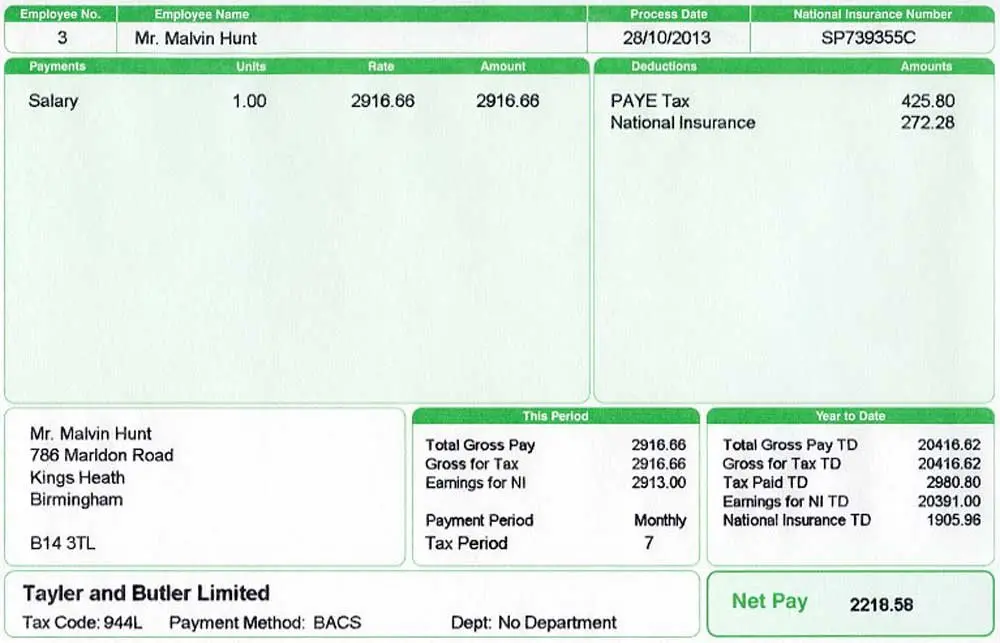
Ask Your Employer for a Replacement Payslip
Start with your current or former employer's payroll or HR team. Explain how many pay periods you need copies for, and whether you need them posted, emailed as a secure PDF, or downloaded from a portal. Under UK GDPR rules, employers can't legally bill you for providing copies of your payslips or personal payroll data unless a request is manifestly unfounded or excessive. If an employer delays responding to an informal email, reminding them of your right to access personal data under UK GDPR data protection rules will usually prompt HR to act swiftly.
Get My Payslips: Where to Look First
Before you even contact HR, check these places — many people find what they thought were lost payslips within minutes:
- Your employer's payroll portal — providers such as ADP, Sage, Xero, BrightPay and Moorepay give employees a self-service login where every pay statement is stored and downloadable as a PDF.
- Your email inbox — search for "payslip" or your payroll provider's name; many companies email a PDF copy each pay period.
- The official HMRC App — download the HMRC App on iOS or Android. It gives instant mobile access to your ongoing pay and tax records submitted via Real Time Information (RTI) and allows you to generate instantly shareable PDF proofs directly from your smartphone.
- Online banking — while your bank won't have the payslip itself, your statement will confirm the net amount and date, which is sometimes enough for a lender.
- Your HMRC Personal Tax Account — this shows the pay and tax figures reported by your employer, which can support a request while you wait.
Payslip Quick Tip
If you need a replacement payslip regularly — for annual mortgage reviews, for example — ask your employer to set you up on their self-service payroll portal so you can download copies yourself, any time, without waiting on HR.
How to Get a Replacement P60 (Lost P60)
A lost P60 causes more stress than a missing payslip, and most people simply want to get their P60 sorted quickly because it's often needed for something with a hard deadline — a mortgage offer, a Self Assessment tax return, or a tax credits renewal. What happens next depends on whether your employer still exists and whether you're still working for them.
Note: For comprehensive Replacement P45 guidance. See our dedicated Replacement P45 Guide.
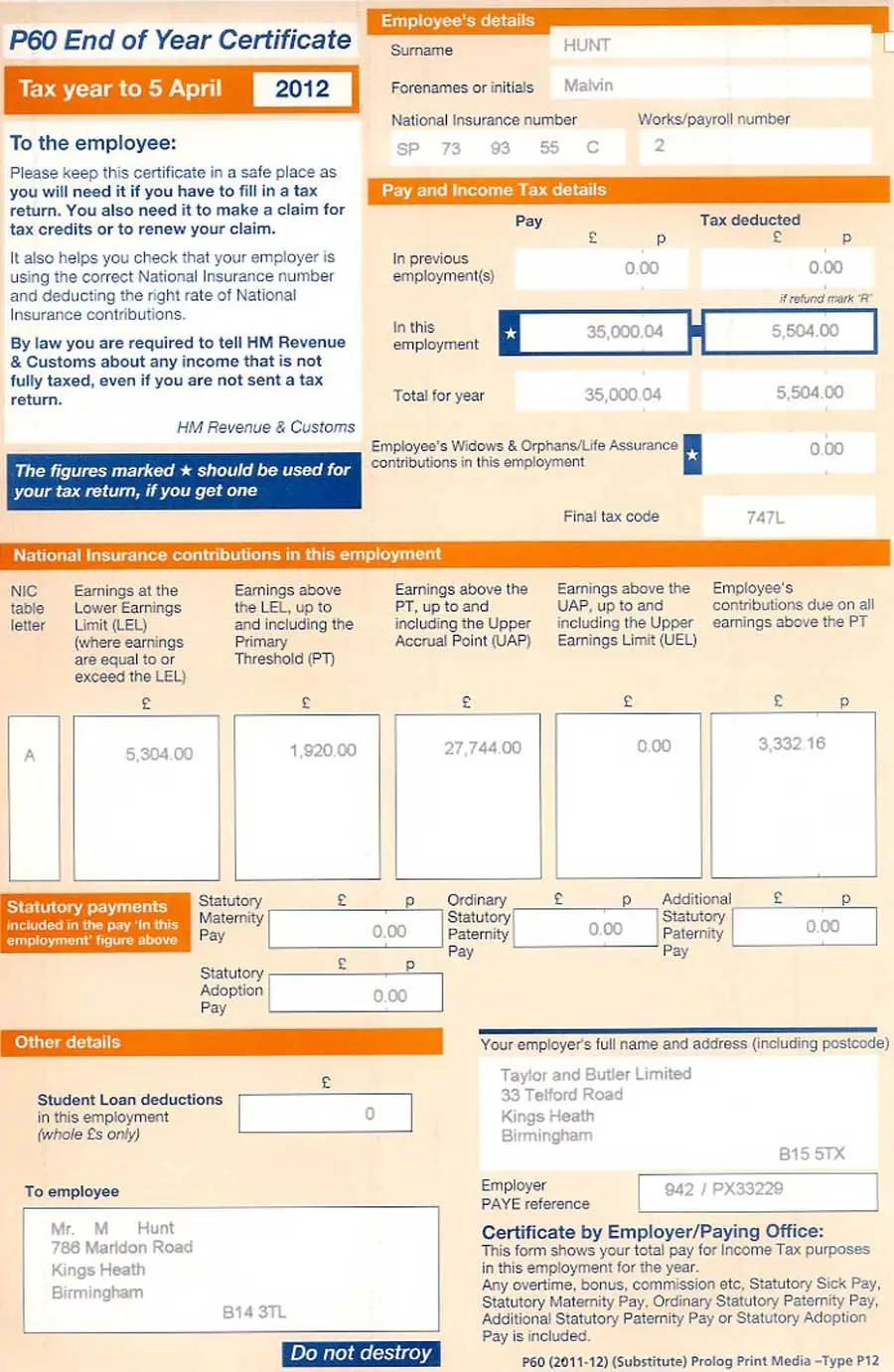
Get My P60: Step-by-Step From Your Employer
- Contact current or former payroll/HR. Employers must keep P60 records for at least three years under Regulation 97 of the Income Tax (PAYE) Regulations 2003 and can normally issue you another copy — often marked "replacement" or "duplicate" to distinguish it from the original. Charges cannot be levied for this service under standard UK GDPR rules.
- Check the payroll portal first. If your employer issues P60s electronically (permitted by HMRC since 2010, provided you can access and retain a copy), your copy may already be sitting in your online account, ready to download instantly.
- Ask for a "Statement of Earnings" if a like-for-like copy isn't possible — most banks, letting agents and lenders will accept this as an equivalent for the relevant tax year.
Can I Get My P60 From HMRC If My Employer Can't Help
HMRC does not issue duplicate P60s, but it holds the same underlying pay and tax data submitted by your employer through PAYE Real Time Information (RTI). If your employer has closed down or can't help you track down a P60, you have two main options:
- Sign in to the HMRC App or Personal Tax Account at GOV.UK to view and download an immediate PDF summary of your pay and tax details for the relevant tax year. Major UK mortgage lenders (such as Halifax, Nationwide, or Santander) will accept an official Personal Tax Account or HMRC App download as valid proof of earnings.
- Request a formal HMRC Employment History Letter / Subject Access Request by calling the HMRC helpline or writing to them. While this provides official confirmation of past earnings and tax deductions, requesting an Employment History Letter by post typically takes 2–4 weeks to arrive, whereas digital PDF downloads via the HMRC App or Personal Tax Account are instant.
For the official position on P60s, P45s and related PAYE forms, HMRC's own guidance is the definitive source: GOV.UK P45, P60 and P11D forms guidance.
How to Get a Replacement P45 (Lost P45)
Of the three documents in this guide, a lost P45 trips people up the most, because — unlike a payslip or a P60 — it genuinely cannot be reissued once it has been given to you. Under regulation 36 of the Income Tax (PAYE) Regulations 2003, an employer is only required to issue a P45 once, when you leave. Neither your old employer nor HMRC is obliged to produce a second copy.
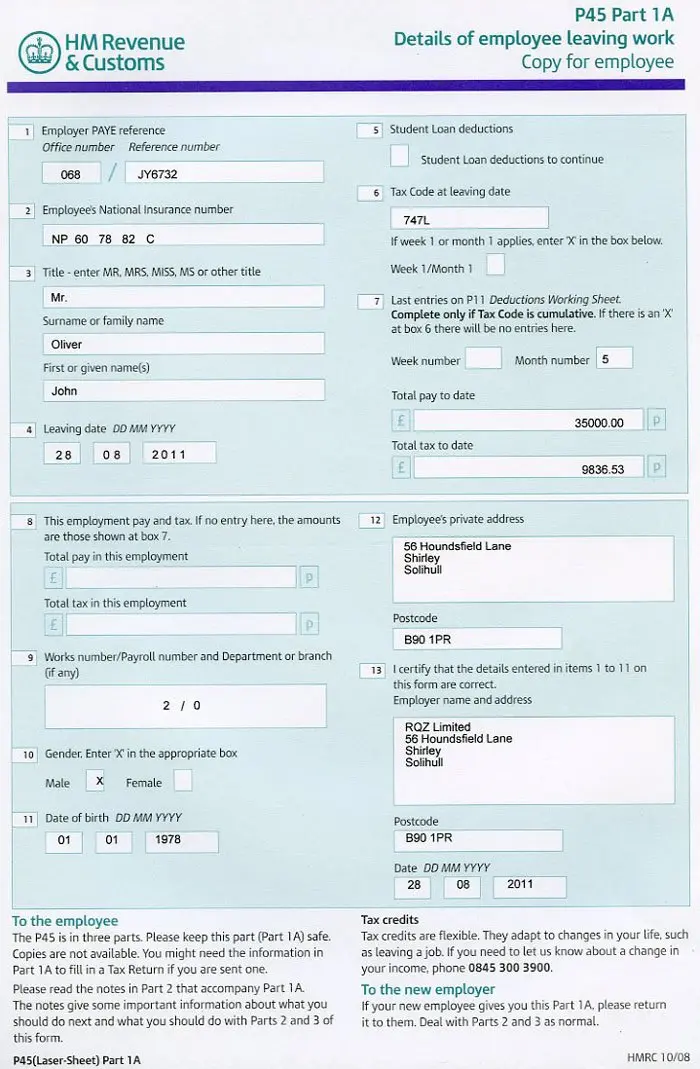
Why P45s Cannot Be "Replaced" — The Starter Checklist
If you have a lost P45 and need it for a new job, don't worry — this is common and there's a built-in fix. Your new employer will simply ask you to complete a Starter Checklist (the modern replacement for the old P46 form, withdrawn in 2013). This form asks a few short questions about your employment history so far this tax year and lets your new employer set the correct tax code and report your details to HMRC through payroll, without needing the original document at all — so even if you can't get your P45 back, you're not stuck.
Note: For comprehensive Lost Payslips guidance. See our dedicated Lost Payslips Guide.
Can I Get My P45: What to Do Next and Avoiding Emergency Tax
- Tell your new employer straight away that you don't have a P45 — this is completely normal and won't hold up your start date.
- Complete the GOV.UK Starter Checklist for PAYE accurately, choosing the correct statement (A, B or C) regarding your employment status since 6 April. Selecting the wrong statement is the leading cause of being placed on an emergency tax code (such as
1257L W1or1257L M1), which taxes your earnings on a non-cumulative basis for that pay period without taking into account your full year-to-date Personal Allowance. - Keep your final payslip from the old job — it contains the year-to-date pay and tax figures that make completing the Starter Checklist much easier.
- Check your first payslip at the new job to confirm the tax code applied looks correct; contact HMRC if you think it's wrong.
If, instead of a new job, you need the information for a benefits claim or your own records and want to get your P45 details, contact your former employer's payroll team and ask for a "statement of earnings" covering your leaving date, pay and tax — this serves the same purpose even though it isn't a formal reissued document.
P45 Quick Tip
A genuine replacement P45 does not exist in UK payroll law — treat any service offering to "reprint" your original P45 with caution, and rely on the Starter Checklist route instead.
Employer Responsibilities for Payslips, P60 and P45
This section is written for UK employers and HR/payroll teams handling requests from staff who've misplaced these documents.
Legal Obligations for Employers in the UK
| Document | Legal requirement | Typical deadline |
|---|---|---|
| Payslip | Must be given to every employee/worker each pay period (itemised pay statement under Section 8 Employment Rights Act 1996) | On or before payday |
| P60 | Must be given to every employee still on payroll on 5 April (Regulation 67 PAYE Regulations 2003) | By 31 May each year |
| P45 | Must be given once, when employment ends (Regulation 36 PAYE Regulations 2003) | When final pay is processed, or shortly after |
How Long Employers Must Keep Payroll Records
Employers are legally required under Regulation 97 of the Income Tax (PAYE) Regulations 2003 to keep PAYE records — including the information behind payslips, P60s and P45s — for at least three years from the end of the relevant tax year. This is what makes it possible for an employer to reissue a payslip or produce a replacement P60 long after the original was first issued, and it's a legal minimum, not a suggestion.
What If You Left the Job Several Years Ago?
The three-year rule is a legal minimum, not a cut-off — plenty of employers, especially larger companies with modern payroll software, keep digital records for much longer simply because storage is cheap and it's good practice. So it's always worth asking, even if you left a role five or ten years ago; you may be pleasantly surprised. If the employer genuinely no longer holds the records, or the business has since closed down, there are still routes worth trying before you give up.
- Check Companies House if the employer was a limited company that's since closed. The company's filing history can show whether it was dissolved, sold, or placed into administration — and if an administrator or liquidator was appointed, they may hold, or know who holds, the old payroll records.
- Ask HMRC for your pay and tax history. Your Personal Tax Account, the HMRC App, and HMRC's own systems typically hold PAYE income data for several years back, which can support pension queries, old tax disputes, or benefit backdating claims even without the original P60 or P45 in hand.
- Pull old bank statements. Most UK banks let you download or request statements going back six or seven years, and a clear pattern of salary payments from a named employer is often accepted as evidence when the original payroll documents no longer exist.
- Check your own State Pension forecast. If the query is really about confirming past earnings or National Insurance contributions for retirement planning, your State Pension forecast on GOV.UK draws on HMRC's own contribution record rather than any payslip, P60 or P45 at all — so it can settle the question without chasing paperwork from a job you left long ago.
Note: For comprehensive Lost P60 guidance. See our dedicated Lost P60 Guide.
Data Protection and Fees When Reissuing Payroll Documents
Payslips, P60s and P45s all contain personal financial data, including National Insurance numbers, tax codes and salary details, so employers have a duty under UK GDPR to handle reissued copies securely. Under UK GDPR regulations, there's no charge allowed for issuing replacement payslips, P60 copies, or personal payroll data unless the request is manifestly unfounded or excessive. Good practice includes verifying the identity of whoever is requesting a copy, sending documents through a secure portal or encrypted attachment rather than plain email where possible, and never leaving printed copies somewhere an unauthorised person could see them. If you're an employee requesting a document by email, it's reasonable to ask your employer how they'll send it securely, particularly if the request covers several years of payslips at once.
Handling Errors on Reissued Documents
If a reissued P60 or payslip contains mistakes — such as an incorrect tax code, wrong National Insurance category, or missing year-to-date earnings — do not submit it to a lender or tax authority as is. Ask your employer's payroll team to correct the record. Employers can rectify errors by resubmitting an amended Full Payment Submission (FPS) with the corrected year-to-date figures to HMRC, and issuing you a revised statement marked "Corrected". (Note: HMRC's older Earlier Year Update process, once used for prior-year corrections, has since been withdrawn — an amended FPS is now the only route.)
What Happens If an Employer Doesn't Comply
An employer that persistently fails to provide a legally required payslip or P60 isn't just being unhelpful — it may be falling short of its statutory obligations under Section 8 of the Employment Rights Act 1996 and the PAYE Regulations. While most cases are resolved informally, an employee can raise the issue formally through their workplace grievance procedure, submit a GDPR Subject Access Request (SAR), or contact ACAS and the Employment Tribunal system as covered later in this guide.
Note: For comprehensive Lost P45 guidance. See our dedicated Lost P45 Guide.
This article is for general information only and does not constitute financial, legal or personal tax advice. Rules on payroll documents, PAYE and tax codes can change, and individual circumstances vary — always check GOV.UK or speak to a qualified adviser before making financial decisions based on this content. Nothing here should be treated as a substitute for advice tailored to your own employment situation, particularly where a mortgage application, tax return or legal dispute is involved.
Reviewed by: Joyce Kim, CTA (Chartered Tax Adviser) — Last updated: 1 September 2026.
Common Reasons People Lose Payslips, P60 and P45 — and How to Avoid It
Understanding why these documents go missing in the first place makes it much easier to avoid the same scramble next year.
A Practical Example
Consider a typical case: someone moves house twice in three years, changes jobs once, and switches from paper payslips to a digital portal along the way. Their old employer's portal access expires 90 days after their leaving date, their forwarding address was never updated with the previous employer, and one year's P60 was never redirected. By the time they apply for a mortgage, they're missing a full year of pay records and a tax year summary — a completely avoidable situation with a little organisation.
Switching Payroll Providers or Software
Another common trigger is a company changing payroll software or outsourcing to a new provider. When that happens, historical records don't always migrate automatically, and employee self-service logins from the old system can simply stop working. If your employer has recently switched providers and you can't log in to see older documents, ask HR whether the historical records were transferred, and if not, whether they're still accessible in the old system or have been exported and archived elsewhere.
Tips to Avoid Losing These Documents Again
- Download and save a PDF copy of every payslip and P60 as soon as it's issued, rather than relying on portal access that may expire after you leave a job.
- Create a dedicated folder (cloud storage or a labelled physical folder) for pay documents and file each one the day it arrives.
- Update your employer with a current address and personal (not work) email as soon as you know you're leaving, so your final paperwork reaches you.
- Download the HMRC App and register for a GOV.UK Personal Tax Account — it's a free backup source for your pay and tax history even if physical documents go missing.
- On your last day in a job, ask HR directly how and when can I get my P45 sent over, so it doesn't get lost in a final-week handover.
Alternatives When You Can't Get a Replacement Document
If your former employer has ceased trading, your records were destroyed, or you simply can't get a replacement payslip, P60 or P45 in time, don't panic — there are official alternatives that banks, mortgage lenders, letting agents and government bodies routinely accept.
Official Proof of Income Documents Lenders Accept
Most third parties don't actually need the physical P60 or payslip itself — they need verified, independent evidence of your income and tax payments. The following alternatives carry legal weight in the UK:
- HMRC Personal Tax Account summary — an official printout or PDF from your online tax account showing your employer, taxable income and tax paid for any recent year.
- HMRC Employment History Letter — requested directly from HMRC, this formal letter details your employer history, dates, and total pay and tax recorded under PAYE.
- Bank statements showing salary credits — three to six months of official bank statements clearly displaying net pay deposits from your employer's named account.
- Employer Statement of Earnings — a formal letter on company letterhead, signed by HR or payroll, detailing your gross pay, net pay, tax code and deductions for the period in question.
- SA302 / Tax Calculation overview — if you complete Self Assessment (for example, as a director or higher earner), an SA302 from HMRC combined with the Tax Year Overview confirms your declared income.
| Missing document | Practical alternative |
|---|---|
| Payslips | Bank statements showing salary deposits, plus a signed letter from your accountant or employer confirming income |
| P60 | HMRC Personal Tax Account printout, or an HMRC letter confirming pay and tax figures for that year |
| P45 | Completed Starter Checklist for a new job; a "statement of earnings" from your old employer for other purposes |
Most UK lenders, letting agents and government bodies are familiar with these alternatives and will accept them — so even if you can't get your payslips reissued in the exact original format, particularly an HMRC Personal Tax Account record, the underlying figures come from the same PAYE data as the original document.
Note: For comprehensive Get My Payslips guidance. See our dedicated Get My Payslips Guide.
How to Request an Official HMRC Income Confirmation
If you need HMRC to confirm your earnings directly to a third party or for your own records, follow these steps:
- Log in to your GOV.UK Personal Tax Account or open the HMRC App on your mobile device.
- Navigate to Pay and Tax Summary or Employment History.
- Select the tax year you need and download the PDF report. This document bears official HMRC branding and is widely accepted by UK mortgage brokers and letting agents.
- If a physical letter is required, call the HMRC Income Tax Helpline on 0300 200 3300 (Textphone: 0300 200 3319) and ask for a written Employment History Letter. Allow 2–4 weeks for postal delivery.
What to Do If Your Employer Refuses to Help
While most employers are happy to reissue payslips or confirm P60 details, some ignore requests or refuse to cooperate. If you run into a brick wall, you have clear legal rights under UK employment and data protection law.
Step 1: Submit a Subject Access Request (SAR) Under UK GDPR
Your payroll records, payslips, P60 data and P45 details are your personal data under the Data Protection Act 2018 and UK GDPR. If an employer ignores informal requests, send a formal Subject Access Request in writing (email or letter) stating:
"Under Article 15 of the UK GDPR, I am requesting copies of all payroll records, itemised pay statements, P60 end-of-year summaries and P45 leaver details held for me for the tax years [insert years]."
Under UK GDPR rules, the employer has one calendar month to respond, and they cannot charge a fee unless the request is manifestly unfounded or excessive. Failing to respond exposes the employer to action from the Information Commissioner's Office (ICO).
Note: For comprehensive Get My P60 guidance. See our dedicated Get My P60 Guide.
Step 2: Contact ACAS for Guidance
If an employer refuses to provide payslips or an itemised pay statement, they may be breaching Section 8 of the Employment Rights Act 1996. Contact ACAS (Advisory, Conciliation and Arbitration Service) on 0300 123 1100 for free, confidential advice on resolving the dispute or taking the matter to an Employment Tribunal.
Step 3: Report PAYE Non-Compliance to HMRC
Employers have a statutory duty under the Income Tax (PAYE) Regulations 2003 to report payroll data via Real Time Information (RTI) and issue required end-of-year documents. If an employer refuses to issue a P60 by 31 May or fails to provide pay statements, report the failure to HMRC's Income Tax Helpline. HMRC can contact the employer directly to enforce PAYE compliance.
Quick Reference: Who to Contact
| Situation | Contact first | Contact if that fails |
|---|---|---|
| Missing payslip, current job | Your payroll or HR team | Line manager, then a written grievance |
| Missing P60, employer still trading | Payroll or HR team | HMRC Personal Tax Account or helpline |
| Missing P60, employer closed | HMRC Personal Tax Account | HMRC helpline by phone |
| Missing P45 | Starter Checklist with new employer | Ask old employer for a statement of earnings |
| Employer unresponsive throughout | Written request with a deadline | ACAS, then Employment Tribunal as a last resort |
Key Takeaways
- Payslips can be reissued: If you have lost your payslips and want to get duplicate payslips, ask your employer's payroll team or check your digital employee self-service portal — employers keep copies for at least 3 years.
- P60s can be duplicated or confirmed: If you have a lost P60 and need to get your P60 sorted, your employer can issue a replacement P60 marked "duplicate", or you can download your official tax summary directly from the HMRC App or Personal Tax Account.
- P45s cannot be reissued: Under Regulation 36 of the PAYE Regulations 2003, a P45 is issued once only. If you have a lost P45, complete a GOV.UK Starter Checklist for your new employer to avoid emergency tax.
- No fees allowed: Employers cannot charge fees for reissuing payslips or personal payroll data under standard UK GDPR rules.
- Digital alternatives are widely accepted: HMRC App PDF downloads, Personal Tax Account summaries, and 3–6 months of bank statements are routinely accepted by UK mortgage lenders and letting agents.
- Enforce your rights: Use a UK GDPR Subject Access Request (SAR), contact ACAS, or report PAYE non-compliance to HMRC if an employer refuses to supply your legally required payroll documents.
Frequently Asked Questions
Can I get a replacement P45 from HMRC?
No. HMRC cannot issue a replacement P45. Under UK payroll rules (Regulation 36 of the Income Tax (PAYE) Regulations 2003), a P45 is produced once by your employer when you leave a job. If you lose it, complete a Starter Checklist (available on GOV.UK) with your new employer so they can set your tax code correctly. You can also view your income history via your HMRC Personal Tax Account.
Note: For comprehensive Get My P45 guidance. See our dedicated Get My P45 Guide.
How long do employers keep payslips and P60 records in the UK?
UK employers are legally required to retain PAYE records — including payslips, P60 data, and P45 records — for at least 3 years from the end of the tax year to which they relate (Regulation 97 of the Income Tax (PAYE) Regulations 2003). Many employers keep digital copies for 6–7 years to comply with general accounting standard practice.
Will mortgage lenders accept bank statements instead of payslips or P60?
Bank statements show income arriving, but most UK lenders require 3 months of payslips and/or your latest P60 alongside bank statements to confirm your gross pay, tax deductions, and employment stability. If you cannot produce physical payslips or a P60, many lenders will accept an official tax summary downloaded from your HMRC Personal Tax Account or the HMRC App.
Can an employer charge me for replacement payslips or a duplicate P60?
No. Under UK GDPR and the Data Protection Act 2018, individuals have a right of access to their personal data without charge. Employers cannot charge a fee for providing copies of past payslips, P60 summaries, or personal payroll data unless a request is manifestly unfounded or excessive.
What happens if I start a new job without a P45?
If you don't have a P45, your new employer will ask you to fill out a Starter Checklist. This form asks simple questions about your current employment status and student loans so your employer can assign a provisional tax code. Completing this accurately ensures you avoid being placed on an emergency tax code.
How do I get replacement payslips from a former employer that went bust?
If your former employer has ceased trading or gone into liquidation, you cannot get replacement documents directly from them. Instead, log in to your HMRC Personal Tax Account or download the HMRC App to access your verified pay and tax details submitted via Real Time Information (RTI). You can also contact the insolvency practitioner handling the company's affairs or call HMRC directly on 0300 200 3300.
Is a P60 required for Self Assessment?
If you were an employee during the tax year and submit a Self Assessment tax return, your P60 contains the exact figures for total pay and tax deducted under PAYE that you must enter. If you've lost your P60, you can obtain the identical figures from your final payslip of the tax year (month 12 or week 52), your online HMRC Personal Tax Account, or the HMRC App.
What is the difference between a P60 and a P11D?
A P60 summarizes your taxable salary and total PAYE tax/National Insurance paid over a single tax year. A P11D is a separate end-of-year form used by employers to report taxable benefits in kind and expenses — such as company cars, private health insurance, or interest-free loans — provided to employees during that year.
What should I do if my replacement P60 or payslip has incorrect figures?
If a replacement payslip or P60 contains errors (such as an incorrect tax code or wrong pay total), contact your employer's payroll department immediately. Employers can correct errors by resubmitting updated year-to-date data to HMRC via Full Payment Submission (FPS) and issuing you a revised document marked "Corrected". If your employer fails to correct the mistake, contact HMRC directly.
Note: We've published in-depth blog posts covering replacement: payslips, P60s, and P45s. Check out our Replacement Payslips blog post to learn everything you need to know about these tax documents.
Conclusion
Missing a payslip, a lost P60 or a P45 feels urgent, but each situation has a well-established fix. If you need to get your payslips sorted, that's usually the quickest job — most employers can turn a request around within days, and many copies are already sitting in a payroll portal you may not have checked. If you're trying to get your P60 replaced, start with your employer, and fall back on your HMRC Personal Tax Account if that's not possible. And if you're trying to get your P45 and it's a genuine lost P45 situation, remember that this one document is different: it cannot be reissued, but the Starter Checklist exists precisely for this scenario, so it won't hold up a new job or leave you stuck on the wrong tax code for long. Employers, for their part, are required to keep payroll records for at least three years, which is exactly what makes most of these replacements possible in the first place. Whichever document you're missing, start with your employer's payroll or HR team, keep your HMRC Personal Tax Account details handy as a backup, and once you've got what you need, save a digital copy immediately so you never have to go through this search again. A little organisation today — one folder, one backup, one habit of checking a document the moment it arrives — is what turns next year's "I can't find it" moment into a five-minute non-issue instead of a week of chasing paperwork.