
Replacement P60: The Complete UK Guide to Getting Yours Reissued
If your P60 has gone missing, you're not stuck. This guide walks you through exactly how to get a Replacement P60 from your employer, what to do if that's not possible, and how to prove your income and tax history in the meantime — whether you need it for a mortgage application, a tax refund claim, a rental reference, a visa application, a benefit claim, or a new employer.
What Is a P60 and Why You Might Need a Replacement P60
A P60 is the certificate your employer issues at the end of each UK tax year (6 April to 5 April), summarising the total pay you received and the tax and National Insurance taken from it. It's one of the most commonly requested payroll documents, which is exactly why so many people end up needing a fresh copy months or even years later — filed away, deleted from an old email account, or lost in a house move.
Wanting a Replacement P60 is more common than most employees realise. Mortgage lenders, letting agents, and even some government departments will ask to see one as proof of your annual income, and if the original can't be found, a reissue is usually the fastest fix.
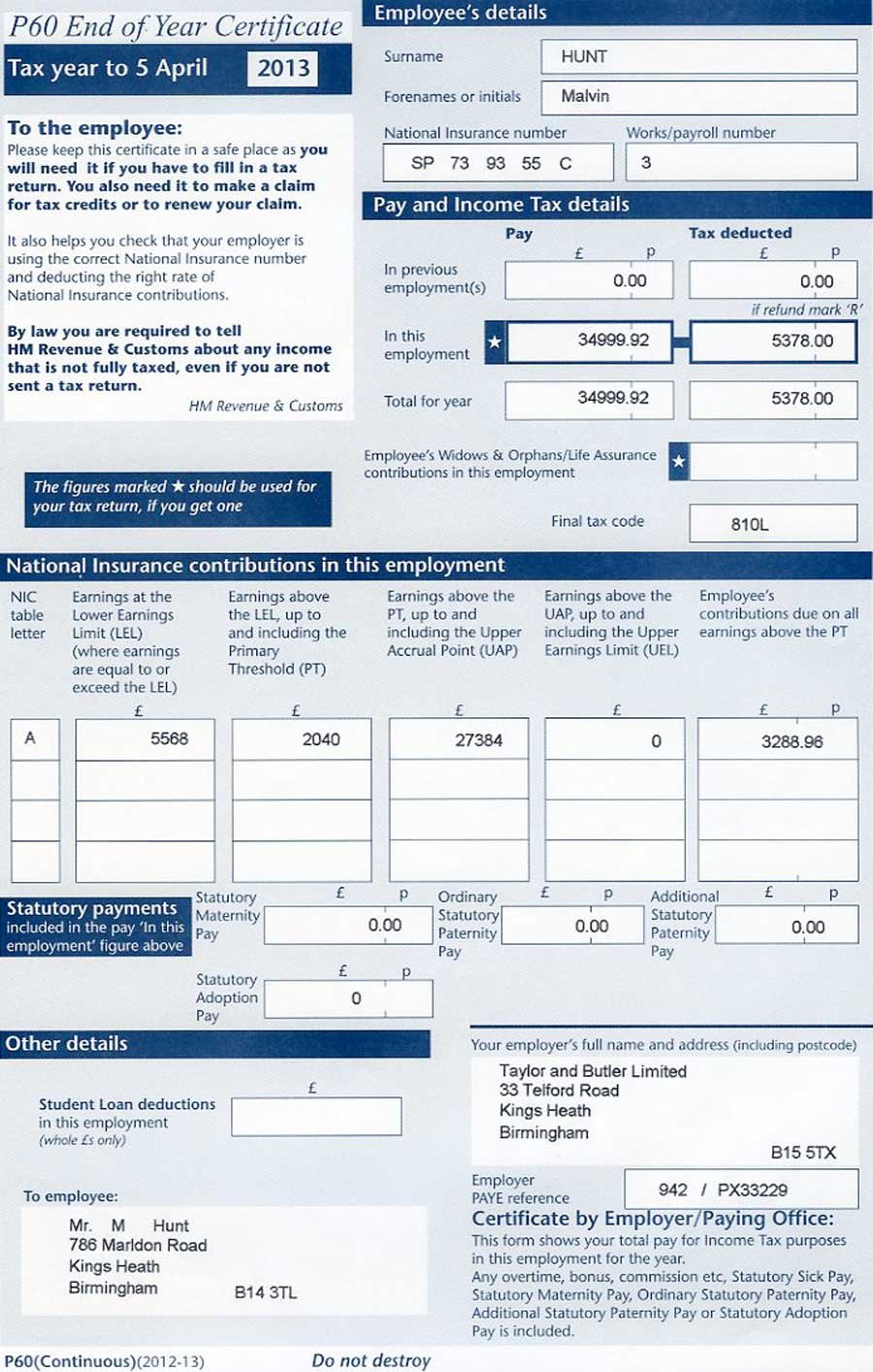
What Information Appears on a P60
Before requesting a Replacement P60, it helps to know what you're actually asking for. A standard P60 includes:
- Your total pay for the tax year, from that employer
- The total Income Tax deducted
- Your National Insurance contributions
- Your tax code and National Insurance number
- Statutory payments, such as maternity, paternity, or sick pay, where relevant
Who Issues Your P60 and When
Only an employer can issue a P60, and only to staff who were on their payroll on 5 April. If you changed jobs partway through the tax year, your former employer would have given you a P45 instead, not a P60 — a distinction worth knowing before you ask the wrong organisation.
It's also worth checking whether you had more than one job on 5 April, since you'll receive a separate P60 from each employer you were on the payroll with that day. If a figure looks incomplete, you may simply be missing a P60 from a second employer rather than needing a Replacement P60 for the one you already have.
| Form | When You Get It | Can You Get a Replacement? |
|---|---|---|
| P60 | End of the tax year, if employed on 5 April | Yes — a Replacement P60 can usually be requested from your employer |
| P45 | When you leave a job | No — employers cannot reissue a P45, but the same figures can be confirmed another way |
| P11D | If you received taxable benefits (e.g. company car) | Usually — a copy can typically be requested from your employer or HMRC |
Note: Haven't found what you're looking for? Head over to our main Replacement Payslips resource centre for more support and our full step-by-step guide .
Steps to Request a Replacement P60 From Your Current Employer
If you're still working for the same employer, getting a Replacement P60 is usually straightforward. Employers are expected to keep payroll records, so reissuing one is typically a quick task for their payroll team.
Check Your Employer's Self-Service Portal First
Before you contact anyone, it's worth logging into your employer's payroll or HR platform. Systems such as Sage, BrightPay, BambooHR, and Workday typically store past P60s under "Documents" or "Pay History," so your Replacement P60 may already be sitting there waiting to be downloaded — often in under two minutes, saving you from requesting a Replacement P60 you may already have, rather than the few working days a manual request can take.
Contacting Your Payroll or HR Team
To request a Replacement P60, follow these steps:
- Contact your payroll department, HR team, or line manager directly
- Confirm the exact tax year you need (for example, 2025 to 2026)
- Ask whether they can email a digital copy or provide a signed paper reissue
- Keep a written record of your request in case you need to follow up
What Your Employer Will Send You
Many employers now hold P60s electronically through their payroll software, which makes producing a Replacement P60 straightforward — often it's simply a case of reprinting or re-exporting the original file as a PDF, typically emailed within a few working days. Some may mark the reissued copy "duplicate," which is perfectly normal and doesn't affect its validity for tax or mortgage purposes.
A word of caution: Some websites offer to sell a "novelty" or template P60 for a fee, sometimes without ever contacting your employer or checking your real figures. These are not genuine tax documents, and using one to misrepresent your earnings to a lender or landlord can amount to fraud. A genuine Replacement P60, or a real HMRC Statement of Earnings, always reflects the pay and tax your employer, or HMRC, actually holds on record — so if a site isn't asking to verify anything, treat it with real caution.
A note on accuracy: This article is intended as general guidance and does not constitute personal financial or tax advice. Payroll and HMRC processes can change, so always confirm your specific circumstances with your employer, HMRC, or a qualified adviser.
Reviewed by: Joyce Kim, CTA Chartered Tax Adviser — Last updated: 15 September 2026.
What to Do If You Can't Get a Replacement P60 From Your Employer
Sometimes a Replacement P60 simply isn't available — perhaps the payroll records weren't kept, or the business no longer operates. In this situation, you're not without options; you just need the same figures from a different source.
Using Your Personal Tax Account or the HMRC App
Your personal tax account and the HMRC app both display your pay and tax history for previous years, which is usually enough to stand in for the original document when a lender or agency needs proof of income. You can view or print this information yourself, without waiting on an employer at all.
Contacting HMRC Directly for Your P60 Details
If you can't access your online account, HMRC can also confirm the figures that would have appeared on your P60 over the phone or by post. HMRC won't reissue an identical duplicate — a P60 can only ever be produced by an employer — but instead, where an employer has ceased trading or can't help, HMRC can issue a Statement of Earnings (form L17): an official letter confirming your gross pay and tax deducted for the year in question. This is widely accepted by mortgage lenders, letting agents, and other organisations in place of the original P60. You can find current contact routes and guidance on the Payslips Guidance pages on GOV.UK.
- Have your National Insurance number ready before you call
- Ask specifically for "pay and tax details" for the relevant tax year
- Request written confirmation for your records, where possible
Note: This post complements our separate article covering Replacement P45 scenarios. If you're looking for a Replacement P45 guidance, see our comprehensive Replacement P45 Guide instead.
Requesting a Replacement P60 From a Former Employer
A request like this doesn't have to come from your current job. Former employers are still expected to hold payroll records for a set retention period, so it's worth asking even if you left the role years ago.
What Happens If the Employer Has Closed Down
If the business has closed, been sold, gone into liquidation, or you simply can't trace it, HMRC becomes your fallback. You can check whether a company still exists — or find the administrator or liquidator now handling its affairs — via the Companies House register, since insolvency practitioners sometimes hold at least some historic payroll records for a period after the business closes. Where no payroll records survive at all, HMRC's Statement of Earnings (covered above) is normally accepted in full substitution for a Replacement P60, because it's drawn from the tax and National Insurance HMRC already holds on file from your former employer's PAYE submissions.
| Your Situation | Best First Step |
|---|---|
| Still employed by the same company | Ask payroll or HR for a fresh copy |
| Left the company recently | Contact their payroll team or former HR contact |
| Company has closed or can't be traced | Use your personal tax account, the HMRC app, or call HMRC |
| Need proof urgently for a lender | Ask if a printed HMRC pay and tax summary is acceptable instead |
Employer Guide: Issuing a Replacement P60 to Staff
Employers occasionally ask about their own obligations here too. If a staff member requests one, there's no formal penalty for reissuing it, and doing so promptly avoids escalation to HMRC on the employee's behalf.
Employer Responsibilities and Deadlines
The original P60 must be issued by 31 May following the end of the tax year, either on paper or electronically, to every employee who was on the payroll on 5 April — missing this deadline can leave an employer facing an HMRC penalty starting at £300, plus £60 for every additional day the P60 remains outstanding. Employers are legally required to keep PAYE records, including the figures behind each P60, for at least three years (the minimum set out in the PAYE Regulations 2003), and many payroll platforms — Sage, BrightPay, and Xero Payroll among them — retain them for considerably longer, which is what makes reissuing a Replacement P60 straightforward well beyond that legal minimum. There's no statutory deadline for reissuing one, but employers are generally expected to respond to reasonable requests within a similar timeframe to other payroll queries, since employees may need it urgently for a mortgage or loan application.
- Keep payroll data accessible for at least three years (the legal PAYE minimum), ideally longer, to make reissuing straightforward
- Clearly mark any reissued copy so it isn't confused with the original
- Direct departed staff to the correct former-employee contact point
Key Takeaways
- A Replacement P60 can usually be requested directly from your employer's payroll or HR team — check their self-service portal first, since it's often already there.
- Only employees on the payroll on 5 April receive a P60 — leavers get a P45 instead, and anyone with two jobs on that date gets a separate P60 from each employer.
- HMRC itself cannot reissue a P60, but if your employer can't help, it can send you a Statement of Earnings — an official letter with the same pay and tax figures, accepted by most lenders.
- Employers must keep PAYE records for at least three years, so a request from a job you left a while ago is often still possible; HMRC recommends keeping your own copy for up to six.
- A reissued or "duplicate" copy is just as valid as the original for tax, benefits, and mortgage purposes — but steer clear of "novelty" P60 sellers that don't verify real figures.
Note: This post complements our separate article covering Replacement Payslips scenarios. If you're looking for a Replacement Payslips guidance, see our comprehensive Replacement Payslips Guide instead.
Frequently Asked Questions
Can I get a Replacement P60 if my employer has closed down?
Yes. If your employer has closed and can't help, you can use your personal tax account, the HMRC app, or contact HMRC directly to get the same pay and tax information for that year.
How long does it take to get a Replacement P60 from an employer?
There's no set legal deadline, but most employers can reissue one within a few working days, especially where payroll records are held digitally.
Is a duplicate P60 accepted by mortgage lenders?
Generally yes. A reissued or duplicate copy carries the same figures as the original and is normally accepted as valid proof of income by lenders and letting agents.
What if I need proof of income but can't get a Replacement P60 in time?
Ask HMRC or check your personal tax account for a printed summary of your pay and tax history — many lenders will accept this while you wait for a fresh copy.
What is a Statement of Earnings from HMRC?
It's an official letter from HMRC (also known as form L17) confirming your gross pay and tax deducted for a specific tax year — the same figures that would appear on your P60. HMRC issues this instead of a duplicate P60, since only an employer can produce the original document, and it's widely accepted as an alternative by mortgage lenders and letting agents.
Do self-employed workers need a P60?
No. P60s only apply to employees paid through PAYE. Self-employed individuals use their Self Assessment tax return figures instead, which HMRC can also confirm on the Payslips Guidance section of GOV.UK.
Conclusion
Losing a P60 isn't the setback it can feel like. In most cases, a Replacement P60 is just a payroll request away, and if your employer genuinely can't help, HMRC and your personal tax account provide a reliable fallback with the same official figures. Whether you need a Replacement P60 for a mortgage, a tax refund, or simply your own records, working through your employer first — and HMRC second — will get you sorted with minimal fuss.